Borders Family History Society

Our archive and search room is now open on Tuesdays and Thursdays from 10am to 4pm. Keep up to date via our Facebook page and Twitter.
Help
This page is intended to provide a brief guide to the pages on the site.
Changes
While changes are being made to the website, it's likely that some pages, including the searches may not be available. Due to the worldwide locations of people with ancestry in the Scottish Borders, it's not possible to find a 'quiet' time when no-one will be visiting the site. Changes rarely take more than 30 minutes, so if the page you want is unavailable, please return after 30 minutes.
Errors
Occasionally, due to factors beyond our control, visitors encounter unusual errors.
If this happens, please try refreshing the page; or on a search results page, repeating the search.
If this does not resolve the problem, please contact the Webmaster using our Contacts Form - Comments about the website, and explain which page you were on, and the error message you received. We will investigate the error, and reply as soon as we can.
Site Map
Search Forms
Each of the search forms work in a similar way.
Please note that names containing an apostrophe, omit the apostrophe in the database.
Use an * if you're not sure of the spelling, as an example, gal* will find all names beginning with 'gal'.
Please don't use ", ?, or '; for names like O'Brien or D'Angibau, search on O* or D*).
Somewhere below the search box (the position will alter depending on the browser you use, and the text size you prefer, there is a box containing a tick with the words 'With Tables'. Although we expect that most people will prefer to view the results as a table, if you don't want the results displayed as a table (for example, because you use a Screen Reader) please uncheck this box. The results will be displayed as a plain text list.
These pages are listed in alphabetical order of the page title. You can use these links to get to the page of your choice, if you wish.
Please use this form if you would like your website included on our Other Websites page.
Please note that we expect you to provide a link to this, the Borders FHS, website in return.
Please note, too, that the list is moderated, so please do not expect to see it there as soon as you have submitted it.
We will check your site as soon as we can, and include your site. We ask for your email address, so that we can contact you if we have problems, but it won't be shown on the website.
Describes the opening hours, sources you can consult, and contains other information which may be of interest. Intended for new visitors, there's a picture of the outside of 52 Overhaugh St, Galashiels, where the Archive and Search Room is located.
Links to a map, the Archive's catalogue of books and pamphlets, CDs, microfiches and microfilms, and the Pedigree Charts surname index.
Use this form to list the books and pamphlets library catalogue in order of category or topic.
Archive - Catalogue of Books and Pamphlets
This shows the books and pamphlets library catalogue in the order you selected.
The Article Index is an index to the articles that have appeared in the Society's magazines. Try entering a surname, a topic, or a place name.
There are links to see the whole index in a table, or in plain text.
See examples of our articles on the Sample Articles page.
Article Index Search - Results
This shows the results of a search of the Article Index.
Please note that the heading Author includes persons who have compiled or transcribed records; and that the topics indexed, and the synopses are subjective opinions.
See the Publications List to buy copies of the magazines containing articles in which you're interested.
This shows the some of the Society's management team.
There's a form for visitors/members to provide feedback, notify us of changes, offer their family tree, or pose a question, without having to open an email application.
The information will be directed to the appropriate person, and if you provide an email address you'll get a copy of the email.
When you register to record Surname Interests or because you've used our Contacts page to send us a message, an email confirmation will be sent to you.
Increasingly, ISPs use filters to try and keep spam out of their customers' inboxes. However, frequently, they also remove the email that you want to receive.
See below for instructions on how to add us to your list of trusted senders in order to make sure you receive emails from us.
AOL: Place the domain "bordersfhs.org.uk" in your address book.
Earthlink: Email from us might be placed in your 'Known spam' or 'Suspect Email' folder. Select the email and approve us.
Hotmail: Place the domain "bordersfhs.org.uk" in your safe list, which you access from the "Options" link next to the main menu tabs.
Yahoo: Emails from us are sometimes placed into the 'bulk' folder. If that happens to you, open the message and click on the "this is not Spam" link next to the "From" field.
Other ISPs: If our email is being filtered, try adding our domain "bordersfhs.org.uk" from our email's 'From' or 'Reply-to' address to your address book or contact list. If this option is not available, try moving the message to your 'inbox' or forwarding the message to yourself.
If subsequent messages continue to be filtered, call or email your ISP's tech support and specifically ask how you can be sure to receive all email from "bordersfhs.org.uk". Follow their instructions for whitelisting "bordersfhs.org.uk".
It's a pity you need to do this, but these measures are beyond our control. We have tried and failed to discuss the problem with AOL, Earthlink, Hotmail and Yahoo.
If you have anti-spam software installed, please ensure that you do not block email from
the domain "bordersfhs.org.uk"
If you do not receive your confirmation email within 2 hours then please check that the email has not been filtered by your email system, which may have incorrectly identified it as spam. If you are still unable to locate the email then please contact us on the Contacts page using the contact type "Problems recording interests" and provide the email address with which you registered.
There are a large number of family trees (pedigree charts) which have been submitted by members as GEDCOM computer files or as paper documents.
The Family Tree Index includes the family trees on paper only.
Use this form to find out which family trees include a name in which you're interested.
Family Tree Search Results
This shows the results of a search for surnames in members' family trees in paper documents.
For each surname in the results, the number of trees is shown, and the references of those to look at.
Feedback Confirmation
This page is shown after the form on the Contacts page has been used to send information to one of the contacts.
This will confirm either that the feedback has been sent, or advise that there was an error.
This enables you to search our index of surnames appearing on gravestones (tombstones) that we have transcribed for a surname in which you are interested.
Results are shown on the Gravestones Index Search - Results page.
It also shows which Burial Places (all in the Scottish Borders) are included in the index of surnames.
There's a link to enable you to see all the surnames in the database. Please note that this may take several minutes.
Gravestones Index Search - Results
This shows the results of a search of the Gravestones Index.
Help
This is the page you're reading.
Tells you about the Society, benefits of being a member, and the annual subscription costs.
Links to Joining Borders Family History Society, Privacy, and Terms and Conditions, Archive and Search Room.
Interests - Change Password
This allows you to change your password. Passwords must be between 8 and 12 characters in length and contain at least 1 letter and at least 1 digit (a numeric character: 0, 1, 2, 3, 4, 5, 6, 7, 8, 9).
This form is to enable people who have registered to logon so that they may maintain their genealogical interests.
Please logon using your email address and password provided in your registration confirmation.
After you've logged on you may change your password, add, change, or delete any or all of your interests.
Please note that if this is your first logon you MUST change your password.
If you are unable to logon, you will not be permitted to change your interests.
If you've forgotten your password, click the Forgotten Password ? link.
After you've successfully logged on, the next page will indicate the choice(s) available.
This form is to register your name and email address before you can record your genealogical interests, so that people who are interested in the same surnames, locations, and time periods can contact you. This facility is for everyone to use. You need to have an email address to register.
Use of our site to maintain your genealogical interests is subject to the terms and conditions shown in the Registration Agreement on the Registration form page.
Interests Registration - Confirmation
After successful registration, an email containing your new password will be sent to your email address. You may then logon, using your email address and password.
This enables you to see if there other people interested in a surname in which you are interested.
Results are shown on a separate page - Interests Surname Search - Results.
Interests Surname Search - Results
This shows whether other people share an interest in a surname in which you are interested, and the locality and time period. You can click on the email address (of displayed interests) to send a reply to the enquirer. Some people may have supplied additional contact details.
Use the Interests Surname Search - Begin to do the search.
Please use this page to find out about the benefits of becoming a member, see our subscription rates, and print or download a joining form.
This enables you to make changes to the name, other contact details, and interests that are displayed on the Interests Surname Search - Results page.
To change name and other contact details, just make the changes you want. Changes can be saved immediately by pressing Save Details button, or saved with changes and additions to interests.
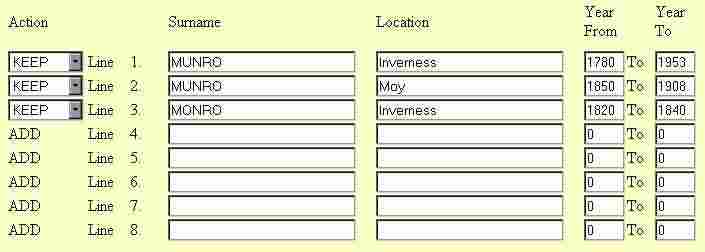
Please see the example below:

Existing interests are shown with KEEP to the left, new blank lines are shown with ADD to the left.
You may keep, change, or delete existing interests.
Use the drop down box on the left of each line to indicate that an interest is to be deleted.
You may add new interests in the blank lines, as few or as many as you wish.
Press the Save Details button to save changes, deletions, and additions.
To add more than 5 interests, save the details, and use the link on the confirmation page to add more.
Please note one name only in surname field, and no apostrophes, /, or brackets. Names will be stored in capitals.
For all years after a year, for example, 'from 1825' enter the Year in the From column, and 0 in the To column.
For all years before a year, for example, 'to 1825' enter 0 in the From column, and the Year in the To column.
'ADD' lines with a blank surname will be ignored.
Please see the example below:
This enables you to see if there is one or more queries about a surname in which you are interested submitted by readers of the Society's magazine. Results are shown on a separate Query Index Surname Search - Results).
Members' Queries Surname Search - Results
This shows the results of a search of queries about a surname in which you are interested submitted by readers of the Society's magazine. You can click on the email address (of displayed queries) to send a reply to the enquirer.
Use the Members' Queries Surname Search - Begin to do the search.
This shows details of all our Monumental Inscriptions volumes currently for sale, including pictures of their front covers.
These are websites not published by the Society that you may find useful.
Content is the responsibility of the provider, and the Society has no control over them, and does not accept any responsibility for them.
There's a link to the Add a Website form, please use this if you would like your website included here. Please note that we expect you to provide a link to this website in return.
These records are about applications for poor relief made by people who were settled in a Borders parish, but not necessarily living there, and provide unique information about the applicants, their families and their life; thus it could help you track down a person’s previous or subsequent address if they moved away from their birth parish.
Similarly, they’ll also be of interest to people whose ancestors were not born in the Borders but may have lived or died in the Borders.
Use this form to find out which volumes of Poor Law Records include a person in which you're interested, or alternatively look at the list of names and birth places to see which ones are included.
Poor Law Records Search Results
This shows the results of a search for surnames (and optionally forenames or birth places) in our published Poor Law Records volumes.
For each name combination in the results, the surname may be accompanied by the forename, birth place, and residence (at the time the record was originally written).
Describes our use of personal information, our privacy practices, and the terms of conditions under which you may use this website.
There's a link to our entry in the Data Protection Commissioner's register.
This is the main page that links to both our own and other organisations' publications that we sell. See our Sales List for postage costs and methods of payment.
There are links to the Monumental (gravestones) Inscriptions series, the Gravestones Index, the Sales List (mainly other organisation' publications), and the Articles Index.
This shows the publications (books and paper documents, CDs, and maps) that the Society has for sale. There's more details of our Monumental (gravestones) Inscriptions volumes which are on the Monumental Inscriptions page.
We have a number of reviews of publications (mainly books), which you may find interesting, some of which we offer on our sales list.
Our Publications Review Policy is on this page, too.
This has links to our Articles Index, Family Trees Index, Gravestones Index, Archive and Search Room, Queries, Interests Surname Search, Interests Logon, Register to record Interests, and Research Service pages.
Use this form to ask for research to be done for you. There is a charge for this service.
There are examples of articles from our magazine here. Read them on screen or download the PDF.
This shows Society meetings, and other events (mainly family history fairs) at which the Society intends to have a stand. Do come along and meet us.